Friday, May 21, 2021

Kupu o te wiki rua

 I saw this in the Guardian and it resonated with me as to how I feel about Aotearoa and te reo. 

"iti ōku toto Māori, engari ko Aotearoa te whenua i whakatipu mai i a au". I don’t have any Māori blood, but Aotearoa is the land that raised me.’”

I am moving to recording slides to try to include audio alongside writing te reo. 

The plan is to listen back at a time when I have improved and have a chuckle at where I have come from.

Also found this new app which I quite like for its local content.


Saturday, April 10, 2021

Kupu o te wiki tahi

Kei te ako tonu au i te reo Māori.

I am still l learning te reo Māori.


This post (Rangitaki) is a learning object for me to check I am making progress.


What I learnt

Ī te ako tonu au - i was still learning te reo Māori

He aha te roa? How long is it

Toko - rod

Whīra - wheel

Ka rawē - awesome

Waka tinei ahi - fire engine

Whiti rau - 700

Haere ki te kainga au - I am going home

Aromatawai - assessment


Commitment to Kaupapa words 

Each time I will try and check against the actual. Once I have got this all green I will look at something else to commit to.


Try

Actual

Rangitu - Empowered

Rangitū - e māna ana

Rangiwhawha - ubiquitous 

Rangiwhāwhā - e horahora ana

Ariari - visible

Ariari - e kite ana

Rangitamiro - Connected

Rangitāmiro - e hono ana


Wednesday, February 10, 2021

How to get a full background pic - New Blogger

New blogger  - Full background image

How to get a full page background image (the new customiser has a bug)

 - Thanks to Herman Fourie  for sharing - this is another look at it step by step.

Instructions for (A work around but does the job) Step 1 

Store the background image (1800 X 1600) for in google drive and open in  a new window


Step 2 

Copy the identifier code from omni bar


 Step 3 Paste the identifier code after the id = in the bright yellow highlighted part of the html code below and copy the whole section of code <Variable name="body.background" description="Body Background" type="background" color="$(body.background.color)" default="$(color) none repeat scroll top left" value="#ffffff url(http://drive.google.com/uc?export=view&amp;id=1gOHtNo6Tc3bdc_evCCbSuaz6XiYS6xOc) repeat fixed top center"/> <Variable name="body.background.size" description="Body Background size" type="string" default="auto" value="100% auto"/>


Now update the Blogger theme

Step 4 


Step 5 

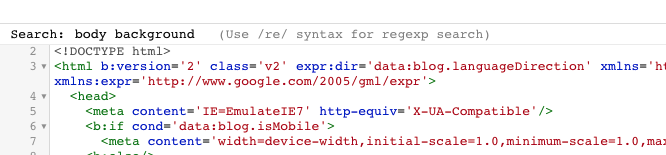
Put your cursor in the HTML and ctrl f will bring up Search: 

Search for body background in the HTML code 


Step 6

Paste your code to replace of the  body background 


   <Variable name="body.background" description="Body Background" type="background"

       ………………. "/>

Note leave the other body.background. variables 


Step 7 

Preview the code - and save it (if it works;-) )


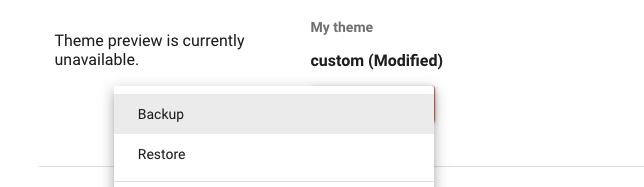
You can now backup the theme and it should restore with the full image in any new blog. 


Resources


Tips from the Blogger team: If you want a full-screen background, we recommend using an image that's 1800 pixels wide and 1600 pixels high, so that the background image can fill the entire screen even for the readers with large monitors.


https://www.lifehacker.com.au/2014/01/share-direct-links-to-files-in-google-drive-and-skip-the-web-viewer/


Friday, August 14, 2020

Sheets countifs

Using Google sheets

People are give an option to reply other in a form. I want to be able to count The number of these. So I am using Countifs


Countifs allow us to count something if it meets multiple criteria

The first field is where to look ie where is the range.
In this case it on the tab responses in the range B2:B
note you need the exclamation mark to reference the tab
responses!B2:B

Determining if a value is not equal
"<>" in quotation marks is the same as not equals

Checking against a cell use an ampersand
&A2 will check against the value in A2

Here is the whole thing below each condition is separated by a comma.


=COUNTIFS(responses!B2:B,"<>"&A2, responses!B2:B, "> ", responses!B2:B,"<>"&A3,responses!B2:B,"<>"&A5,responses!B2:B,"<>"&A6,responses!B2:B,"<>"&A7,responses!B2:B,"<>"&A8,responses!B2:B,"<>"&A9,responses!B2:B,"<>"&A10,responses!B2:B,"<>"&A11,responses!B2:B,"<>"&A12,responses!B2:B,"<>"&A14,responses!B2:B,"<>"&A4)))

Thursday, May 28, 2020

Te Reo - a tēnei marama

Having a go at building te reo Māori. 

What I am going to try to do is us the audio recording in slides for this. 

I am saving the mp3s to practice and trying to build a base. 


Wednesday, May 20, 2020

A voice to listen to a Voice to be heard

The following slides show

  • why adding audio to slides add accessibility
  • how you can easily record it on a chromebook
  • the adding it process and
  • how to share


Wednesday, May 6, 2020

Posting tinkercad to your blog

Below is a sample of a tinker cad model embedded in a blog and a how to do it

A great way to show that the learners have been able to work in three dimensions and a way to share what they have 3d printed or intend to print. Have a play with the model picture

Alongside this they could share picture of the finished result prototype from along the way.
Often with the prototype share they might be able to seek direct feedback from blog partners too.


I have made a quick video howto below
In the meantime - check out the wonderful 3d print school from Taranaki for examples of 3 d printing from young people.