Great to have the blogapp.manaiakalani.org up and running.
Able to past in pictures
insert links

My Mum -- Dorothy Winter -- Was a teacher She Motivated me to be a life long learner. The pics in this header show her as a young school girl - to teacher. I will be educhecking in her honour here at educheck.blogspot.com
Great to have the blogapp.manaiakalani.org up and running.
Able to past in pictures
insert links
New blogger - Full background image
How to get a full page background image (the new customiser has a bug)
- Thanks to Herman Fourie for sharing - this is another look at it step by step.
Instructions for (A work around but does the job) Step 1
Store the background image (1800 X 1600) for in google drive and open in a new window

Step 2
Copy the identifier code from omni bar

Step 3 Paste the identifier code after the id = in the bright yellow highlighted part of the html code below and copy the whole section of code <Variable name="body.background" description="Body Background" type="background" color="$(body.background.color)" default="$(color) none repeat scroll top left" value="#ffffff url(http://drive.google.com/uc?export=view&id=1gOHtNo6Tc3bdc_evCCbSuaz6XiYS6xOc) repeat fixed top center"/> <Variable name="body.background.size" description="Body Background size" type="string" default="auto" value="100% auto"/>
Now update the Blogger theme
Step 4

Step 5
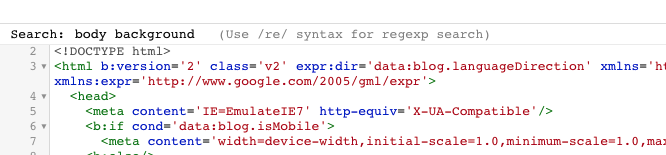
Put your cursor in the HTML and ctrl f will bring up Search:
Search for body background in the HTML code
Step 6
Paste your code to replace of the body background
<Variable name="body.background" description="Body Background" type="background"
………………. "/>
Note leave the other body.background. variables
Step 7
Preview the code - and save it (if it works;-) )

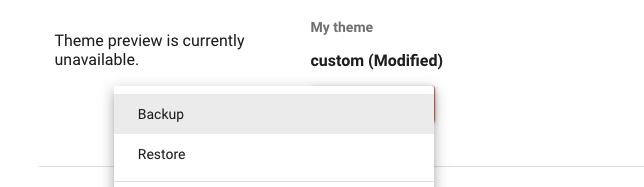
You can now backup the theme and it should restore with the full image in any new blog.
Resources
Tips from the Blogger team: If you want a full-screen background, we recommend using an image that's 1800 pixels wide and 1600 pixels high, so that the background image can fill the entire screen even for the readers with large monitors.
| Class | Blog address | Year Level |
| Room 14 Hamilton East School | http://room14-hes.blogspot.com/ | Year 3 & 4 |
| Room 15 Hamilton East School | http://room15hes.blogspot.com/ | Year 2 & 3 |
| Room 16 Hamilton East School | http://room16hes.blogspot.com/ | Year 2 |
| Room 13 Hamilton East School | http://room13hes.blogspot.com/ | Year 3 & 4 |
| Room 10 Hamilton East School | http://room10hes.blogspot.com/ | Year 5 & 6 |
| Room 11 Hamilton East School | http://room11hes.blogspot.com/ | Year 5 & 6 |
| Room 12 Hamilton East School | http://room12hes.blogspot.com/ | Year 5 & 6 |
| Room 5 Hamilton East School | http://room5hes.blogspot.com/ | New Entrants |
| Room 4 Hamilton East School | http://room4hes.blogspot.com/ | Year 1 |
| Room 1 Hamilton East School | http://room1hes.blogspot.com/ | Year 1 & 2 |
| Room 2 Hamilton East School | http://room2hes.blogspot.com/ | Year 1 & 2 |
| Room 8 Hamilton East School | http://room8hes.blogspot.com/ | New Entrants |
| Room 7 Vardon School | http://room7vardonschool.blogspot.com/ | Year 3 & 4 |
| Room 8 Melville Intermediate | http://melvilleroom8.blogspot.com/ | Year 7 & 8 |
| Room 9 Glenview Primary School | http://glenviewgo.com/ | Year 1 & 2 |
| Room 3 St Andrew’s Middle School | http://sams.ultranet.school.nz/ClassSpace/53/ | Year 7 & 8 |
| Room 7 Frankton School | http://room7frankton.blogspot.com/ | Year 3 & 4 |