A few projects
Jared's Pallet bike rack
Here is a sample off the Certificate level Challenge

To make it a success we learnt a few things that might help.


My Mum -- Dorothy Winter -- Was a teacher She Motivated me to be a life long learner. The pics in this header show her as a young school girl - to teacher. I will be educhecking in her honour here at educheck.blogspot.com
The Students have designed some inventions and spoken about the on ustream.
I was impressed by the creativity that went into ideas such as the “ultimate hair brush”,
”The Magniball wall” and the “Super Alpaca feeding station”. The ability to adapt, change and think in different ways shows that young students are able to move from designing to inventing. Well done.
It takes bit of strength to get up in front of the camera. There is a pause for about 30 seconds while one student gets up the courage to show what they invented.
After a long time of being busy helping setting up a new professional learning community I finally had a chance to work with students again. So what Am I trying to concentrate on.

We are going to look at a couple of movies to find out.

 Kid Inventions file
  The Fun Theory file
  What is happening to mobile phones? Resource Heaps of inventions to look at. file Kid inventors on Ellen Show Resource
Where do Inventions come from? from Media team on Vimeo.
What we think about inventions and where they come from.
My last post presented a little snippet from a Cellphone policy from Montgomery School District. Essentially it said no phone/mobile device should enter or be used here. The policy was written perhaps four years ago and could have been seen as a safe move given what the perceived possible contribution to learning compared to possible issues unacceptable use might raise. The balance is tipping at lightning speed (and forever) with devices such as the ipod touch, iphone, android devices, netbooks etc. Their possible contribution is real contribution. 
I have said and have to repeat that management issues aside we are forgoing an opportunity to learn to be better; to move into a new paradigm rather than just admire it from afar as the kids get on with it. The steps we need are bolder and quicker. Schools are slowly coming round to the idea of 1to1 provision and here it is in an ipod touch for $300 New Zealand Dollars. The video below looks at the experience of a school in the U.K.
A Safe Step may be to allow these touch devices which though not a phone are all but and use our schools wireless networks for connectivity. The next generation will undoubtedly have cameras and mics making them a reasonably solid platform for learning especially once a few apps come down from the appstore. What I think we need to realise fast is that we if we converge some of the functionality we have been get elsewhere into one of these devices they are not as expensive as they first seem.
This to me is one device format that we will see in almost everyone’s future and generally it will contain a phone as well.
These devices will undoubtedly enable learning, save lives and change lives.
Are we big enough to let them change our schools?
When will we let this take place?
Here are some of the things an iPhone can do today. This is a small selection There are 100,000 apps in the store many costing $0.99 making opportunities nearly endless.
| Camera |  | $100 |
| Torch |  | $20 |
| Notebook |  | $5 |
| GPS |  | $200 |
| stopwatch |  | $20 |
| media player |  | $60 |
| Games console |  | $400 |
| Mapbook |  | $10 |
| Spirit level |  | $20 |
| TV |  | $100 |
Others may not agree but a mobile device that has iPhone capability is a point that will soon be achievable for more of the population than having their own pc ever was. To me the important thing is that it will be personal and so will the learning.
Mark Prensky is debating should we give a four year old an iPhone?
Some other links
Elsewhere we can find out about 5 (Free) iPhone Apps Every Parent Should Have.
Exams phone a friend
My son Jack is studying for NCEA Spanish. Being a geek and believing that a computer and the internet will solve all ills I looked to the web for a way through. I was amazed at how empty searches were when looking resources that would really help. I was taking part in an online meeting with 0ZNZ educators and by chance one of them specialises in modern Languages He had alot of ideas about learning using technology. His name is Joe Dale and his wiki is found at http://joedale.typepad.com/. Michael Fawcett a local blogger who I have alot of respect for was talking about what his daughter used as study tools and both confirmed the use of mp3s and flashcards as the major tools for exam preparation. I have started to work with these ideas and Jack has recommended Spanishdict.com. I have also come across Quizlet which is an online flashcard place. Between now and the end of the year Jack will put some of the NCEA vocab into Quizlet. I have embedded a match up below see how you get on.
Having been through a year of 1 to 1 laptop use in our school I am preparing for a workshop at ulearn09 looking at what schools need to prepare for 1 to 1 learning. Many people will be seeing this as a simple transition to a greater density of devices on their networks. The best way for us to decide and think about this is probably to consider the implications of future events. The following are discussion starters for some important questions in this process.
|
|  |
And the answers are…
Well ok No answers but there is no doubt these are important questions. We have had to increase our network support in-house to accommodate this. We purchased a very robust looking computer the classmatepc. We have 130 of these being used by year 7 students who take them home and we have had dealt with one issue that effected over 50% of these. So the two Big Answers To Purchasing and maintenance…

And
Possible scenarios that might make sense
If you do not have on site tech support provide a service where the device can be dropped off at the schools reception desk and picked up by supplier from there.
If you need tech support to be managed by parents the information evenings and
Here is an example of an RFP (request for proposals) that may help you if you want to use one.
Rfp Netbook TemplateWe are starting to use google docs for our students
Why for those who are not sure?
Once we get over the wow look at this, look at that; we need to focus on how to improve learning.
Nick Rate has a good idea for writing the pic below links to his full post with examples.
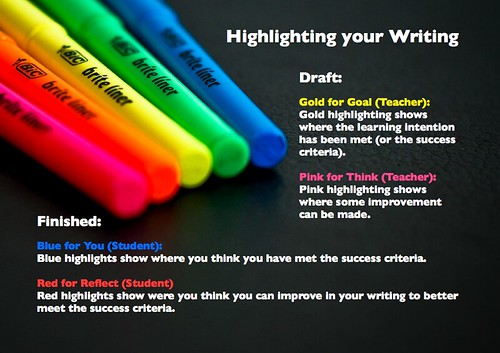
Colours could also be used to identify (multiple concurrent authors is powerful learning just ask Vygotsky)
This Google presentation has some other good ideas
I am working with some teachers on this tomorrow and it needs to be about teaching and learning
the good thing with google docs is I know it can be just that.
Are we still focused on the assessment of reading age and other quantitative measures in New Zealand? Here is an explanation of what the “six year net” does. For those overseas the six year net looks at reading for six year olds and traditionally provided an opportunity for those struggling to enter a reading recovery programme. This is still the case today. From ministry sources
"What is the 6-year old net?
The 6-year old net is a literacy test carried out with each student when they turn six years old. It measures a student's knowledge and understanding of letter identification, how much they know about how books, text and pictures work, basic word recognition and how many words the students can write in 10 minutes dictation."
We do need to assess how students are going in literacy and numeracy to understand where they are at and to attempt to place the learner in a place where they can read to learn rather than learn to read.This also provides some meaningful data and attempts to identify students who may struggle to have the literacy skills to personalise their learning.
These assessments are what we know how to do are they not.
But
What are they? the national academy of engineering even see to “advance personalised learning” in the top 14 challenges of the 21st Century
could we have
It measures the students understanding of how contribute positively to their immediate family, friends and the wider community.
It measures the students keep themselves healthy and assist in the well being of those around them.
It looks at how many practical things the student can do and how their skills are helping to make the planet sustainable.
Have had this post in draft for a while and with little else in the pipeline time to let it rip.

I have Skype, my nieces have Skype, my daughter has Skype. Who doesn’t ?
One class I was working with talked about using a multi-participant chat as a backchannel much like twitter.
This is a good idea and one I intent to trial later this week with classes from three different schools
A parent however reminded me of the opportunity for an outsider to intrude on a chat or directly contact
students without their request. I order to deal with this students need to alter their privacy settings.
Perhaps the selections shown with red arrows are the most appropriate. In other countries the students would
be protected at school from this possibility of unwanted contact. I like the idea that we can help them learn to manage this themselves.
Look out for Nerd Girl aka Kristine Kopelke.
I am going to see if we can get Nerd Girl to come to New Zealand. When I attend workshops presentations I see two main possibilities for them to be highly successful in changing my thinking practice or beliefs.
The first possible type of Professional Learning Success...
This is achieved by facilitating dialogues within a group where people share ideas reflect on big questions or are somehow active and learning by doing. There was great dialogue on the last day of MISC09 where participants rotated around the room with one member staying one going clockwise and one anti-clockwise. The questions presented were along the lines of

Why this professional learning works is likely because it addresses William Glasser survival understanding.
People feel empowered that they belong etc.
This is the type of professional learning that should be provided 80 % of the time. I hope facilitators understand this as a key understanding for working with learners.

The second possible type of Professional Learning success...
Is where the facilitator delivers their view point experiences and ideas in a more (sage on the stage style). For this to work I feel the presenter needs to use a unique lens (perspective) or reflection method to create something meaningful new and insightful for the audience.This second way is far more hit and miss: sometimes the presenter is delivering on a concept we don't understand, already understand or does so in a way that doesn't demonstrate originality or added value. Originality is about slight differences and comes from looking at something in a different way across disciplines and in exploration. This type of delivery will often lead to large differences in satisfaction between one audience member and another.
I thought Kristine was very good because her perspective was fresh yet logical: to look at what students are presently doing on the web as an insight into what we might get them to do and for what purpose.
What students were doing that struck a chord

If we are going to improve learning for students personalise learning and achieve higher potentials we need to pay heed to these ideas as mechanisms to assist students in our school environments.
The full presentation can be found here
Kristine Bluetoothed the presentation to a number of attendees flash enabled phones.
The application below will run on most Flash enabled mobile phones and can also be navigated through online by using the enter, arrow and number keys on the keyboard.
To view the app here online, click on it with your mouse and then use the enter, arrow and number keys on your keyboard to navigate through the application.
Links for Kristine
Something that begins with play
Contact: Kristine Kopelke -
Tel: 5459 4590
Learning Innovation Centre Sunshine Coast
URL: http://www.earlyphaseicts.com

Cheryl Doig workshop at 1@s 2009
What I thought after workshop.
Notes from Workshop
Looking at engagement and examples of it. Cheryl has as many ?s as answers. Students can feel different and isolated at school because they are away from technology.
Students working together create a living breathing work. Combining Skype and Google docs for example. My belief is that literacy and communications skills will thrive in this environment
We discussed "Is full student engagement needed for learning." Four of us thought no we can multi-task. There are assume potions on beliefs we have about oar students experience. These do not always play out look at Sally Boyd's research at NZCER. United Kingdom group has placed student involvement into sitting, crawling, walking and Running. National College of School Leadership http://www.thinkbeyond.co.nz/assets/documents/Doig_SelfMan.pdf
Kelly Hines has asked students to keep feeding back to her. showing the students you will follow up on things is important.
Strategy One
Use student feedback to find out positives and areas for change.

Strategy two
Build driving forces reduce inhibiting forces.
Cheryl's wet-paint wiki on
community engagement.

Mark Treadwell Talked about the Juniors ie Students aged 5 to 7
At the Learning at Schools conference last week in Rotorua. He was talking about the need to remove pressure from junior classrooms for everything but language. He mentioned that science for example should have no real objective beyond say being amazed by the world around us. This could be achieved by looking at some things though a microscope (perhaps one a day for a week) The mosquito wing below is a prime example. The main message I see is to reduce and simplify moving to essential knowings and concepts rather than skills and discrete objectives. What we need to be comfortable with is what do student really need to learn at age 6? What Can they Learn?


